<!DOCTYPE html>
	<html lang="vi" xmlns="http://www.w3.org/1999/xhtml" prefix="og: http://ogp.me/ns#">
	<head>
<title>Các bước chi tiết giúp người mới sử dụng tạo đề trắc nghiệm online</title>
<meta name="description" content="Các bước chi tiết giúp người mới sử dụng tạo đề trắc nghiệm online - Savefile - Tin Giáo dục">
<meta name="author" content="Hệ thống thi trắc nghiệm trực tuyến AZtest">
<meta name="copyright" content="Hệ thống thi trắc nghiệm trực tuyến AZtest [edu29.admin@gmail.com]">
<meta name="robots" content="index, archive, follow, noodp">
<meta name="googlebot" content="index,archive,follow,noodp">
<meta name="msnbot" content="all,index,follow">
<meta name="generator" content="NukeViet v4.4">
<meta name="viewport" content="width=device-width, initial-scale=1">
<meta http-equiv="Content-Type" content="text/html; charset=utf-8">
<meta property="og:title" content="Các bước chi tiết giúp người mới sử dụng tạo đề trắc nghiệm online">
<meta property="og:type" content="website">
<meta property="og:description" content="Savefile - Tin Giáo dục">
<meta property="og:site_name" content="Hệ thống thi trắc nghiệm trực tuyến AZtest">
<link rel="shortcut icon" href="https://tuvanthitracnghiem.com/favicon.ico">
<link rel="shortcut icon" href="https://tuvanthitracnghiem.com/themes/cuc_cntt/images/favicon/logo_site_32.png" type="image/png" />
<link rel="apple-touch-icon" sizes="57x57" href="https://tuvanthitracnghiem.com/themes/cuc_cntt/images/favicon/logo_site_57.png" />
<link rel="apple-touch-icon" sizes="60x60" href="https://tuvanthitracnghiem.com/themes/cuc_cntt/images/favicon/logo_site_60.png" />
<link rel="apple-touch-icon" sizes="72x72" href="https://tuvanthitracnghiem.com/themes/cuc_cntt/images/favicon/logo_site_72.png" />
<link rel="apple-touch-icon" sizes="76x76" href="https://tuvanthitracnghiem.com/themes/cuc_cntt/images/favicon/logo_site_76.png" />
<link rel="apple-touch-icon" sizes="114x114" href="https://tuvanthitracnghiem.com/themes/cuc_cntt/images/favicon/logo_site_114.png" />
<link rel="apple-touch-icon" sizes="120x120" href="https://tuvanthitracnghiem.com/themes/cuc_cntt/images/favicon/logo_site_120.png" />
<link rel="apple-touch-icon" sizes="128x128" href="https://tuvanthitracnghiem.com/themes/cuc_cntt/images/favicon/logo_site_128.png" />
<link rel="apple-touch-icon" sizes="144x144" href="https://tuvanthitracnghiem.com/themes/cuc_cntt/images/favicon/logo_site_144.png" />
<link rel="apple-touch-icon" sizes="152x152" href="https://tuvanthitracnghiem.com/themes/cuc_cntt/images/favicon/logo_site_152.png" />
<link rel="apple-touch-icon" sizes="180x180" href="https://tuvanthitracnghiem.com/themes/cuc_cntt/images/favicon/logo_site_180.png" />
<link rel="icon" type="image/png" href="https://tuvanthitracnghiem.com/themes/cuc_cntt/images/favicon/logo_site_32.png" sizes="32x32" />
<link rel="icon" type="image/png" href="https://tuvanthitracnghiem.com/themes/cuc_cntt/images/favicon/logo_site_192.png" sizes="192x192" />
<link rel="icon" type="image/png" href="https://tuvanthitracnghiem.com/themes/cuc_cntt/images/favicon/logo_site_96.png" sizes="96x96" />
<link rel="icon" type="image/png" href="https://tuvanthitracnghiem.com/themes/cuc_cntt/images/favicon/logo_site_16.png" sizes="16x16" />
<link rel="canonical" href="https://tuvanthitracnghiem.com/news/tin-tuc-giao-duc/cac-buoc-chi-tiet-giup-nguoi-moi-su-dung-tao-de-trac-nghiem-online-358.html">
<link rel="alternate" href="https://tuvanthitracnghiem.com/news/rss/" title="Tin Giáo dục" type="application/rss+xml">
<link rel="alternate" href="https://tuvanthitracnghiem.com/news/rss/tin-tuc-giao-duc/" title="Tin Giáo dục - Tin tức giáo dục" type="application/rss+xml">
<link rel="alternate" href="https://tuvanthitracnghiem.com/news/rss/Tin-tuc-su-kien/" title="Tin Giáo dục - Tin tức sự kiện" type="application/rss+xml">
<link rel="alternate" href="https://tuvanthitracnghiem.com/news/rss/tu-van/" title="Tin Giáo dục - Tư vấn" type="application/rss+xml">
<link rel="preload" as="script" href="https://tuvanthitracnghiem.com/assets/js/jquery/jquery.min.js">
<link rel="preload" as="script" href="https://tuvanthitracnghiem.com/assets/js/language/vi.js">
<link rel="preload" as="script" href="https://tuvanthitracnghiem.com/assets/js/global.js">
<link rel="preload" as="script" href="https://tuvanthitracnghiem.com/themes/cuc_cntt/js/news.js">
<link rel="preload" as="script" href="https://tuvanthitracnghiem.com/themes/cuc_cntt/js/main.js">
<link rel="preload" as="script" href="https://tuvanthitracnghiem.com/themes/cuc_cntt/js/bootstrap.min.js">
<link rel="StyleSheet" href="https://tuvanthitracnghiem.com/assets/css/font-awesome.min.css">
<link rel="StyleSheet" href="https://tuvanthitracnghiem.com/themes/cuc_cntt/css/bootstrap.min.css">
<link rel="StyleSheet" href="https://tuvanthitracnghiem.com/themes/cuc_cntt/css/style.css">
<link rel="StyleSheet" href="https://tuvanthitracnghiem.com/themes/cuc_cntt/css/style.responsive.css">
<link rel="StyleSheet" href="https://tuvanthitracnghiem.com/themes/cuc_cntt/css/news.css">
<style>
	body{background: #fff;}
</style>
<script data-show="inline">(function(i,s,o,g,r,a,m){i['GoogleAnalyticsObject']=r;i[r]=i[r]||function(){
(i[r].q=i[r].q||[]).push(arguments)},i[r].l=1*new Date();a=s.createElement(o),
m=s.getElementsByTagName(o)[0];a.async=1;a.src=g;m.parentNode.insertBefore(a,m)
})(window,document,'script','https://www.google-analytics.com/analytics.js','ga');
ga('create', 'UA-209483916-1', '.tuvanthitracnghiem.com');
ga('send', 'pageview');
</script>
</head>
	<body>
<div id="print">
	<div id="hd_print">
		<h2 class="pull-left">Hệ thống thi trắc nghiệm trực tuyến AZtest</h2>
		<p class="pull-right"><a title="Hệ thống thi trắc nghiệm trực tuyến AZtest" href="https://tuvanthitracnghiem.com/">https://tuvanthitracnghiem.com</a></p>
	</div>
	<div class="clear"></div>
	<hr />
	<div id="content">
		<h1>Các bước chi tiết giúp người mới sử dụng tạo đề trắc nghiệm online</h1>
		<ul class="list-inline">
			<li>Thứ tư - 06/07/2022 23:29</li>
			<li class="hidden-print txtrequired"><em class="fa fa-print">&nbsp;</em><a title="In ra" href="javascript:;" onclick="window.print()">In ra</a></li>
			<li class="hidden-print txtrequired"><em class="fa fa-power-off">&nbsp;</em><a title="Đóng cửa sổ này" href="javascript:;" onclick="window.close()">Đóng cửa sổ này</a></li>
		</ul>
		<div class="clear"></div>
		<div id="hometext">
			Nếu bạn có nhu cầu tìm một website chuyên tạo đề thi trắc nghiệm online để giúp học sinh của mình ôn thi thật tốt thì bài viết sau đây sẽ giới thiệu đến bạn địa chỉ tạo đề thi trắc nghiệm online tối ưu, và chỉ dẫn cụ thể các bước để tạo đề thi ngay trên website này.
		</div>
				<div class="imghome">
			<img alt="Làm thế nào để tạo đề thi trắc nghiệm online hiệu quả?" src="https://tuvanthitracnghiem.com/uploads/news/2022_07/cach-chinh-phuc-noi-so-noi-tuoc-dam-dong-cua-ban.png" width="460" class="img-thumbnail" />
		</div>
		<div class="clear"></div>
		<div id="bodytext" class="clearfix">
			<p dir="ltr" style="text-align: justify;">Thi trắc nghiệm là một hình thức thi mới và được Bộ GD&amp;ĐT dùng làm hình thức thi tốt nghiệp THPT. Hình thức này yêu cầu lượng kiến thức sâu rộng, tư duy cao, phản xạ nhanh.</p>

<p dir="ltr" style="text-align: justify;">Để tạo đề thi trắc nghiệm online hiệu quả, bạn cần biết vài điều dưới đây:</p>

<h2 dir="ltr" style="text-align: justify;"><strong>1. Các kiểu trắc nghiệm online thông dụng</strong></h2>

<div dir="ltr" style="text-align: justify;">Có 3 kiểu trắc nghiệm thông dụng: Trắc nghiệm khách quan, Trắc nghiệm theo kiểu vấn đáp, Trắc nghiệm dạng viết.</div>

<h3 dir="ltr" style="text-align: justify;"><strong>a. Trắc nghiệm khách quan</strong></h3>

<div dir="ltr" style="text-align: justify;">Là dạng trắc nghiệm lựa chọn đáp án A, B, C, D, lựa chọn đúng sai hoặc điền từ vào chỗ trống. Phương pháp thi này mặc dù có ưu điểm là kiểm tra được số lượng lớn thí sinh và công bằng, nhưng nhược điểm thì vô cùng lớn đó là thí sinh có khuynh hướng mò đáp án, không đánh giá được diễn biến tư duy của thí sinh và giáo viên rất khó soạn đề.</div>

<h3 dir="ltr" style="text-align: justify;"><strong>b. Trắc nghiệm theo kiểu vấn đáp</strong></h3>

<div dir="ltr" style="text-align: justify;">Đây là hình thức thi đòi hỏi sự kết hợp giữa giáo viên và học sinh, giáo viên hỏi và học sinh trả lời theo cách hiểu của bản thân. Hình thức này có ưu điểm là dễ dàng kiểm tra được năng lực và khả năng trình bày vấn đề của học sinh nhưng nhược điểm là chỉ kiểm tra được vài người trong một thời gian nhất định.
<div class="image-center">
<figure class="image"><img alt="Thí sinh đang làm bài thi trắc nghiệm online" height="499" src="https://tuvanthitracnghiem.com/uploads/news/2022_07/thi-sinh-dang-lam-bai-thi-trac-nghiem-online.jpg" width="800" />
<figcaption>Thí sinh đang làm bài thi trắc nghiệm online</figcaption>
</figure>
</div>

<h3><strong>c. Trắc nghiệm dạng viết</strong></h3>
Đây là hình thức thi theo kiểu có rất nhiều câu hỏi và bạn phải trả lời vắn tắt cho từng câu. Đây có thể gọi đúng hơn là thi tự luận.

<h2><b id="docs-internal-guid-2c89e1d9-7fff-b5a2-a848-b203b430a82e">2. Lý do bạn nên sử dụng ứng dụng tạo đề thi trắc nghiệm online của AZtest</b></h2>

<ul>
	<li aria-level="1" dir="ltr">
	<p dir="ltr" role="presentation">Đây là một Website thi trắc nghiệm trực tuyến đầu tiên dựa trên nền tảng của ứng dụng NukeViet</p>
	</li>
	<li aria-level="1" dir="ltr">
	<p dir="ltr" role="presentation">Là một website được tạo ra để phục vụ cho mọi đối tượng, không giới hạn người sử dụng</p>
	</li>
	<li aria-level="1" dir="ltr">
	<p dir="ltr" role="presentation">Khác với các website thi trắc nghiệm khác, AZtest có khả năng nhập đề thi từ Microsoft Word</p>
	</li>
	<li aria-level="1" dir="ltr">
	<p dir="ltr" role="presentation">Học sinh có thể xem được kết quả và đáp án ngay sau khi hoàn thành bài thi</p>
	</li>
	<li aria-level="1" dir="ltr">
	<p dir="ltr" role="presentation">Có khả năng xếp loại kết quả kiểm tra của học sinh</p>
	</li>
	<li aria-level="1" dir="ltr">
	<p dir="ltr" role="presentation">Tổng hợp được học sinh tham gia để giáo viên quản lý</p>
	</li>
	<li aria-level="1" dir="ltr">
	<p dir="ltr" role="presentation">Dựa vào bộ đề gốc, hệ thống sẽ tự động trộn đề để đưa ra bộ đề phù hợp cho từng loại học sinh…</p>
	</li>
</ul>

<h2><strong>3. Hướng dẫn tạo đề thi trắc nghiệm online trên AZtest</strong></h2>

<p dir="ltr">Thi trắc nghiệm online đã trở nên quen thuộc với mọi người, hầu như các môn thi đều chuyển sang hình thức thi trắc nghiệm. Việc tạo ra các trang web thi trắc nghiệm và lựa chọn các website chất lượng để ôn luyện các đề thi trắc nghiệm cho học sinh là rất cần thiết. Vậy nên, AZtest xin được hướng dẫn cách tạo đề thi trắc nghiệm online cho bạn để tạo các bộ đề ôn tập cho học sinh của mình.</p>

<p dir="ltr">Đầu tiên, bạn phải đăng ký khởi tạo <strong><a href="http://aztest.vn/">AZtest</a> <a href="https://aztest.vn/site/register/#register-form">tại đây</a></strong></p>

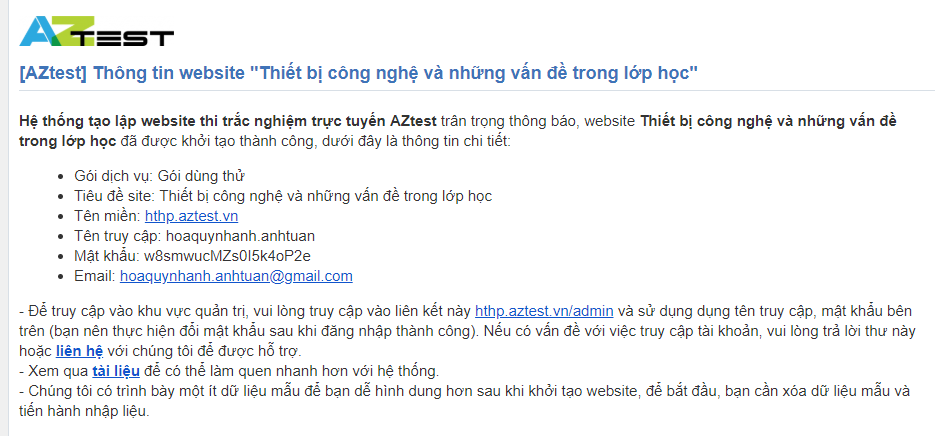
<p dir="ltr">Sau khi bạn đã đăng ký thành công, tài khoản và mật khẩu của bạn sẽ được gửi về Email mà bạn đã đăng ký<br />
&nbsp;</p>

<div class="image-center">
<figure class="image"><img alt="" height="371" src="https://tuvanthitracnghiem.com/uploads/news/2022_07/capture-1.png" width="800" />
<figcaption></figcaption>
</figure>
</div>
Bạn sẽ nhận được mail kèm theo tên đăng nhập và mật khẩu, click vào <strong>đây</strong> để bắt đầu thêm đề thi của riêng bạn.

<div class="image-center">
<figure class="image"><img alt="" height="215" src="https://tuvanthitracnghiem.com/uploads/news/2022_07/capture-2.png" width="800" />
<figcaption></figcaption>
</figure>
</div>
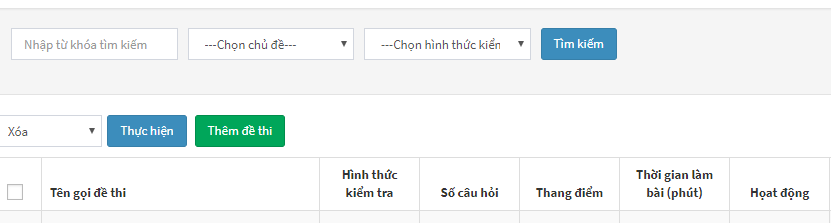
Click vào mục “<strong>Thêm đề thi</strong>” để bắt đầu tải lên đề thi.

<div class="image-center">
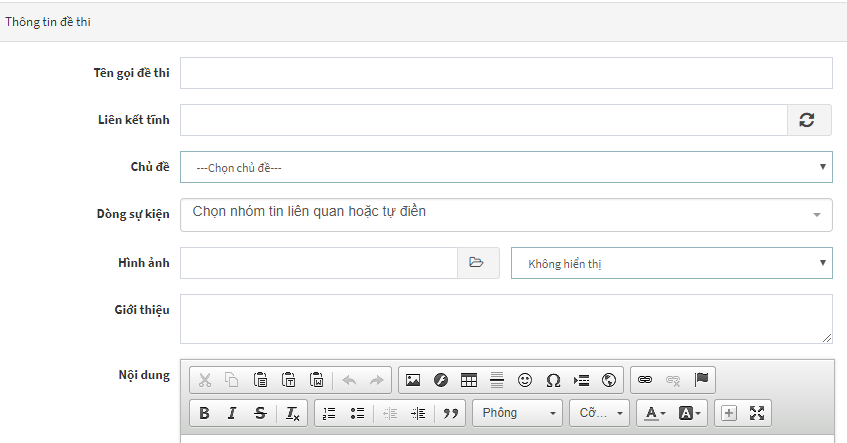
<figure class="image"><img alt="Giao diện thêm đề thi của AZtest" height="418" src="https://tuvanthitracnghiem.com/uploads/news/2022_07/giao-dien-them-de-thi-cua-aztest.png" width="800" />
<figcaption>Giao diện thêm đề thi của AZtest</figcaption>
</figure>
</div>
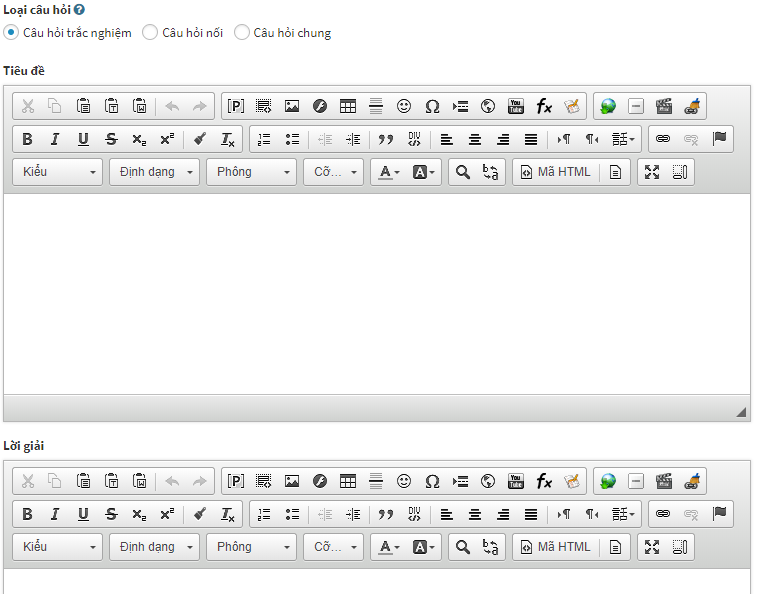
Sau khi điền các thông tin xong, bạn click “Cập nhật” sau đó lần lượt nhập câu hỏi kèm đáp án của bài vào từng câu 1 theo giao diện sau

<div class="image-center">
<figure class="image"><img alt="" height="626" src="https://tuvanthitracnghiem.com/uploads/news/2022_07/capture-3.png" width="800" />
<figcaption></figcaption>
</figure>
</div>
Qua các bước dễ dàng như vậy, bạn đã có thể tạo ra một bộ đề trắc nghiệm gồm nhiều câu cho học sinh của mình tham gia ôn luyện rồi. Hãy trải nghiệm ngay ứng dụng <strong><a href="http://aztest.vn/">tạo đề thi trắc nghiệm online</a></strong> của <strong><a href="http://aztest.vn/">AZtest</a></strong> để thử và cảm nhận nhé!<br />
&nbsp;
<p dir="ltr"><em><strong>&gt;&gt;&gt; Nguồn:</strong></em> <u><em><strong><a href="https://aztest.vn/tin-tuc/tin-giao-duc/huong-dan-tao-de-thi-trac-nghiem-online-cho-nguoi-moi-su-dung-96.html">https://aztest.vn/tin-tuc/tin-giao-duc/huong-dan-tao-de-thi-trac-nghiem-online-cho-nguoi-moi-su-dung-96.html</a></strong></em></u>.</p>
<em><strong>&gt;&gt;&gt; Xem thêm:</strong></em> <u><em><strong><a href="https://tuvanthitracnghiem.com/news/tin-tuc-giao-duc/su-dung-he-thong-trac-nghiem-truc-tuyen-trong-truong-hoc-dem-lai-nhung-loi-ich-gi-357.html">Sử dụng hệ thống trắc nghiệm trực tuyến trong trường học đem lại những lợi ích gì?</a></strong></em></u>.</div>

<div dir="ltr" style="text-align: justify;">&nbsp;</div>
		</div>
	</div>
	<div id="footer" class="clearfix">
		<div id="url">
			<strong>URL của bản tin này: </strong><a href="https://tuvanthitracnghiem.com/news/tin-tuc-giao-duc/cac-buoc-chi-tiet-giup-nguoi-moi-su-dung-tao-de-trac-nghiem-online-358.html" title="Các bước chi tiết giúp người mới sử dụng tạo đề trắc nghiệm online">https://tuvanthitracnghiem.com/news/tin-tuc-giao-duc/cac-buoc-chi-tiet-giup-nguoi-moi-su-dung-tao-de-trac-nghiem-online-358.html</a>

		</div>
		<div class="clear"></div>
		<div class="copyright">
			&copy; Hệ thống thi trắc nghiệm trực tuyến AZtest
		</div>
		<div id="contact">
			<a href="mailto:edu29.admin@gmail.com">edu29.admin@gmail.com</a>
		</div>
	</div>
</div>
        <div id="timeoutsess" class="chromeframe">
            Bạn đã không sử dụng Site, <a onclick="timeoutsesscancel();" href="https://tuvanthitracnghiem.com/#">Bấm vào đây để duy trì trạng thái đăng nhập</a>. Thời gian chờ: <span id="secField"> 60 </span> giây
        </div>
        <div id="openidResult" class="nv-alert" style="display:none"></div>
        <div id="openidBt" data-result="" data-redirect=""></div>
<div id="run_cronjobs" style="visibility:hidden;display:none;"><img alt="" src="/index.php?second=cronjobs&amp;p=r8i37mA4" width="1" height="1" /></div>
<script src="https://tuvanthitracnghiem.com/assets/js/jquery/jquery.min.js"></script>
<script>var nv_base_siteurl="/",nv_lang_data="vi",nv_lang_interface="vi",nv_name_variable="nv",nv_fc_variable="op",nv_lang_variable="language",nv_module_name="news",nv_func_name="savefile",nv_is_user=0, nv_my_ofs=-4,nv_my_abbr="EDT",nv_cookie_prefix="nv4c_a9vJI",nv_check_pass_mstime=1738000,nv_area_admin=0,nv_safemode=0,theme_responsive=1,nv_is_recaptcha=0;</script>
<script src="https://tuvanthitracnghiem.com/assets/js/language/vi.js"></script>
<script src="https://tuvanthitracnghiem.com/assets/js/global.js"></script>
<script src="https://tuvanthitracnghiem.com/themes/cuc_cntt/js/news.js"></script>
<script src="https://tuvanthitracnghiem.com/themes/cuc_cntt/js/main.js"></script>
<script src="https://tuvanthitracnghiem.com/themes/cuc_cntt/js/bootstrap.min.js"></script>
</body>
</html>